
HP Smart InkTank 670 All-in-One Printer

Looking for a reliable, all-in-one printer that won’t burn a hole in your pocket every time you print? The HP Smart InkTank 670 All-in-One Printer might just be the perfect fit for your home or small office. In this review, we’ll break down what makes this printer a standout, compare it to a close competitor, and answer some common questions so you can decide if it’s right for you.
Whether you’re printing school projects, business documents, or family photos, the HP InkTank 670 is designed to make your life easier—and more affordable.
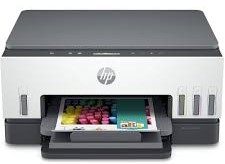
🖨 What Is the HP Smart InkTank 670 All-in-One Printer?
In simple terms, the HP Smart InkTank 670 is an all-in-one inkjet printer that can print, scan, and copy. What sets it apart is its refillable ink tank system, which means no more expensive cartridges—just easy, spill-free refills that last for thousands of pages.
This is a printer made for everyday use. It’s compact, budget-friendly, and smart enough to connect with your phone for wireless printing through the HP Smart App.
🔍 Key Features & Specifications
Here’s a quick rundown of what you get with the HP 670 InkTank:
- Functions: Print, Scan, Copy
- Print Technology: InkTank (Inkjet)
- Connectivity: USB, Wi-Fi, Wi-Fi Direct, HP Smart App
- Print Speed: Up to 12 ppm (black), 5 ppm (color)
- Page Yield: Up to 6,000 pages (black), 8,000 pages (color) with original HP ink
- Monthly Duty Cycle: Up to 3,000 pages
- Display: Simple control panel with smart buttons
- Mobile Printing: Yes (works with Android and iOS)
- Ink Bottles Included: Yes – Black, Cyan, Magenta, Yellow
- Ink Refilling: Spill-free bottles with key-based system
- Borderless Printing: Yes (up to A4)
It’s designed to save up to 90% on printing costs compared to cartridge-based printers. That’s a big win for families, students, and small businesses alike.
🆚 How It Stacks Up: HP InkTank 670 vs Epson EcoTank L3250
If you’re comparing models, the Epson EcoTank L3250 is a worthy competitor. Here’s how they compare:
| Feature | HP Smart InkTank 670 | Epson EcoTank L3250 |
|---|---|---|
| Print Speed | 12 ppm (black), 5 ppm (color) | 10 ppm (black), 5 ppm (color) |
| Borderless Printing | Yes | Yes |
| Mobile Printing App | HP Smart App (easy setup) | Epson Smart Panel (more basic) |
| Ink System | Key-lock spill-free bottles | Open nozzle bottles |
| Price Range | Mid-range | Slightly higher |
| Connectivity | USB, Wi-Fi, Wi-Fi Direct | USB, Wi-Fi |
While both are great for home use, the HP 670 wins points for ease of use, mobile app experience, and smoother ink refills. Plus, the HP Smart App is genuinely user-friendly—no tech degree required!
✅ Real-World Use Cases
Here’s where this printer shines:
- For Students: Print assignments, research, and projects without stressing over ink.
- For Home Offices: Great for day-to-day document printing and scanning receipts or invoices.
- For Families: Save on prints for everything from photos to coloring pages.
- For Small Businesses: High-yield ink makes it cost-efficient for regular printing tasks.
👍 Pros and 👎 Cons
Pros:
- ✅ Extremely low running costs
- ✅ Crisp, clean prints (especially in black text)
- ✅ Easy wireless setup and mobile printing
- ✅ Spill-free refilling with smart ink bottles
- ✅ Compact and attractive design
Cons:
- ❌ No Automatic Document Feeder (ADF)
- ❌ No duplex (double-sided) printing
- ❌ Not ideal for heavy-duty photo printing
❓ Frequently Asked Questions (FAQ)
Q1: Does it support wireless printing?
Yes! The HP Smart InkTank 670 supports Wi-Fi, Wi-Fi Direct, and printing via the HP Smart App.
Q2: How do I refill the ink tanks?
Refilling is super simple. The printer uses key-lock ink bottles, so you can’t mess it up. Just flip, fit, and refill—no spills.
Q3: What type of ink does it use?
It uses HP GT53/GT52 original ink bottles, which are designed to last for thousands of pages.
Q4: Is it good for printing photos?
It can handle photo printing, but it’s better suited for documents and everyday color prints. If you need professional-level photo prints, consider a photo-dedicated printer.
Q5: Can I use it without a computer?
Yes. With mobile printing via the HP Smart App, you can print directly from your smartphone or tablet.
📱 See It in Action
Want to see how it looks before buying? Check out real images of the HP InkTank 670 on our social pages:
We’ve posted photos and demos to help you get a better feel for it.
🛒 Final Thoughts: Should You Buy the HP Smart InkTank 670?
If you’re after a smart, affordable, and easy-to-use all-in-one printer, the HP Smart InkTank 670 checks all the right boxes. It’s especially great if you want to cut down on ink costs without sacrificing quality or features.
Sure, it’s not perfect for every scenario, but for everyday home and small office use, it’s one of the best bang-for-buck options out there right now.
🎯 Ready to Upgrade Your Printing Game?
Don’t wait till you run out of ink or overpay for cartridges again.
Buy the HP Smart InkTank 670 All-in-One Printer today from General Traders—your trusted source for original printers and office tech. We offer:
- ✅ Genuine products
- ✅ Fast delivery
- ✅ Excellent customer satisfaction
📦 Get yours now and enjoy worry-free printing from a name you can trust.
🛍 Visit us on Facebook: facebook.com/generaltraders.pk
📸 Or follow us on Instagram: @generaltraders26
Tags: HP InkTank 670 Review, Affordable All-in-One Printer, Best Home Printer 2025, InkTank vs EcoTank, Buy HP Printer in Pakistan, General Traders Printer Store, Spill-Free Ink Refill Printer, Wireless InkTank Printer
